KRPK Fleet — route, driver and fleet scheduling
When a company's logistics depend on one person's memory
- Client
- A bakery plant with 23 delivery routes across three regions
- Scale
- 20+ vehicles a day, about 180 driver–vehicle–route assignments a week
- Role
- Business analyst, .NET developer
- Deployment
- In production on the company's local network, no internet needed
The problem
The bakery sends more than twenty vehicles a day on 23 delivery routes across three regions. Departures run from 3:30 to 6:30 a.m., with about 180 driver–vehicle–route assignments per week.
The schedule lived in five linked Excel sheets: the weekly route schedule, vehicle assignments, the annual allocation, the garage layout and the driver qualification matrix. The sheets had drifted apart. The same driver was listed on different vehicles in different tables, route names had two or three spellings, and some formulas had broken.
But the real problem wasn't the spreadsheets. The rules for choosing a replacement driver existed nowhere. Who knew which route, which vehicle could physically carry the order, who could drive solo and who needed an escort — all of it lived in the heads of two or three employees. When a driver called at 6 a.m. to say he wasn't coming in, only someone who remembered those rules could cover the route.
The owner put the goal simply: make it possible for anyone to re-plan the schedule.
The solution
Analysis before development
Work started with a review of the existing files. It surfaced things the company hadn't seen:
- three routes were covered by only two drivers, and the second driver on all three was the same substitute, so his absence left no backup at all;
- one route had no qualified driver in the matrix, even though it ran every day;
- a driver regarded as ordinary was qualified for ten routes and was never used for replacements;
- vehicle capacity was a hard limit on only one route out of 23, but there it ruled out three quarters of the fleet.
These findings reshaped the project. The system was built not as a nicer spreadsheet, but as a way to move knowledge from people's memory into a database.
The schedule as a working canvas
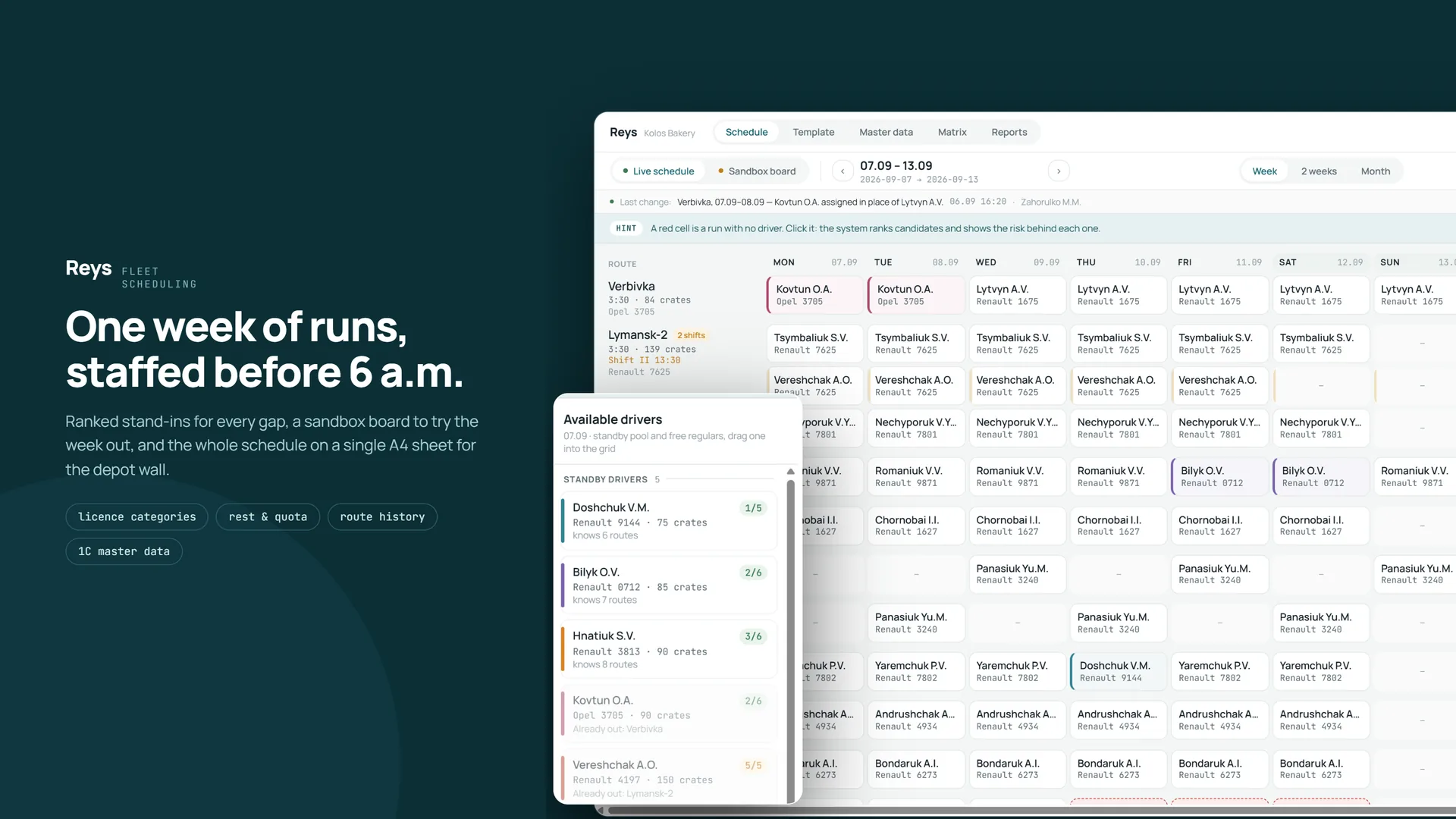
The main screen mirrors the structure the client already knew: routes as rows, days as columns, driver and vehicle in each cell. It shows one week, two to three weeks or a full month.
Uncovered trips are highlighted separately from days when a route doesn't run. These are different situations, and confusing them had cost the company missed departures. Substitute drivers get their own colour automatically. Previously the sales manager coloured cells by hand every week to check by eye that no one was booked in two places at once.
Templates with cycles
A standard week is defined as a template, and the schedule is generated from it for any period ahead. Some routes run on a two-week cycle, with days off alternating between two drivers. The template is a set of equal positions rather than "main driver plus exceptions", so these rotations need no extra rules. Routes that run every other day or only on certain days use the same mechanism.
Finding a replacement
This is the key scenario. Clicking an uncovered trip opens a panel of candidates ranked by suitability. Each one shows a route-knowledge score, their vehicle, their workload for the week and a plain-language explanation: "been once or twice, needs an escort", "busy: Uman-1", "won't fit: 139 crates, max 100".
Suitability is calculated for the driver together with their vehicle. A person may know the route but still can't take it because the vehicle is too small. Candidates who don't qualify are shown dimmed with the reason rather than hidden, so the user can see the option was considered.
Drivers are grouped into call-up tiers: dedicated substitutes, available regular drivers, and last resort. A manager who is only called in emergencies will never top the list, but stays available.
A system that warns
Checks work on two levels. Red blocks the action: the driver doesn't know the route, the vehicle is in repair, the order won't fit. Yellow warns but allows it: a seventh working day in a row, load close to capacity, escort required.
The system also shows consequences. If a driver is taken off their own route, that route immediately shows an uncovered trip, and the system says so plainly. The problem hasn't disappeared, it has moved, and that is now visible.
Every action can be undone in one step, and every change is logged with its author and time.
Risk analytics
A dedicated screen calculates coverage for each route — how many drivers can run it on their own — and shows which routes would be left without backup if a specific person is absent. This screen gave management a picture no spreadsheet had ever shown.
Working with incomplete data
The system was designed for reference data that fills in gradually. A missing capacity doesn't mean "nothing fits", and a missing workload doesn't mean zero: the check is simply skipped and everything else keeps working. This let the system go live before all the fleet specifications had been collected.
Results
The schedule no longer exists as five contradictory spreadsheets. Weekly manual colouring, counting working days and cross-checking sheets have been replaced by a single workspace where an uncovered trip is visible at once and the system suggests the replacement.
Knowledge that used to live in a few employees' memory is now in a database and shown at the moment of decision. Any employee can re-plan the schedule, not just the person who remembers all the rules.
For the first time, management saw how much logistics depended on individual people, and got a tool that measures that risk continuously.
Technologies
More case studies
- Universam — loyalty program for a regional retail chain
- RMT Suite — distribution analytics and merchandising platform
- Kyros — internal document approval system
- KRPK Bakery App — mobile ordering for a bakery's retail partners
- Bakery ordering portal
- krivoozerska.ua — corporate website of a mineral water producer
- B2B portal for distributors
- Pallet Mark — pallet labelling on the production floor
- Retail equipment tracking system
- bakery.krpk.net — bakery plant showcase site
- English Global Express API